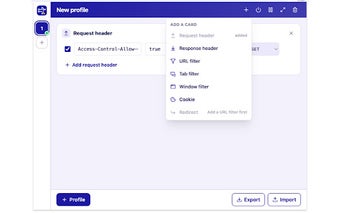
HeaderKit: Lightweight Chrome extension for HTTP header editing
HeaderKit, from GeoffZhu, is a Chrome extension that helps developers inspect and modify HTTP headers directly in the browser for testing and debugging workflows. It focuses on in-page header editing, request inspection, and quick workflow preparation so API requests and server responses can be tested without external tools. The extension highlights a minimalist interface and direct DevTools access, aimed at web developers, QA engineers, and security researchers who need concise header control during development.
What problems does HeaderKit solve for developers?
HeaderKit targets header-level testing and debugging by letting users edit request and response headers inside the browser session. The tool supports preparing header workflows for API debugging and checking server responses without switching to a separate proxy. For developers and QA engineers who need focused header edits during development cycles, the extension reduces context switching by keeping header tasks within the browser.
How light is HeaderKit on browser resources and workflow impact?
The extension is deliberately small and designed to limit overhead, with a file size of approximately 114KiB. That footprint corresponds to a compact install and low resource demands during normal use, so it does not add a large background process or heavy assets to the browser. Users who test multiple endpoints can keep the tool available without a noticeable increase in routine browsing resource use.
What privacy and maintenance practices should users expect?
HeaderKit declares a zero-data-collection policy and is maintained by an individual developer as a non-trader entity. The developer explicitly states that no user data is collected or sold, which addresses common privacy concerns for network tools. The extension is also available on Chromium-based browsers, and its small user base reflects its niche role for technical users rather than broad consumer adoption.
Best suited to focused header work, with single-maintainer trade-offs
HeaderKit is a practical choice for developers and security testers who need a compact, no-frills header editor and prefer tools maintained by a single author; the declared zero-data-collection policy supports privacy-sensitive workflows. Because the extension has a small user base and is individually maintained, use it in a separate development profile and keep configuration backups outside the browser to reduce disruption if updates change behavior.